
Zentty Docs
Themes & Settings
Zentty reads Ghostty themes, writes a small TOML config, syncs selected agent themes, and keeps editor launch targets local.
Applies to current public Zentty builds. Last updated May 11, 2026.
Ghostty Themes
Zentty resolves Ghostty themes from your local Ghostty config and theme directories, with a polished default if Ghostty is not installed. The app can watch config and theme files, apply changes live, and preserve non- theme Ghostty settings while changing theme or opacity from settings.
- Set a local theme name in settings.
- Adjust background opacity from the appearance panel.
- Keep OpenCode synchronized with the terminal theme when the matching option is enabled.
Theme Gallery
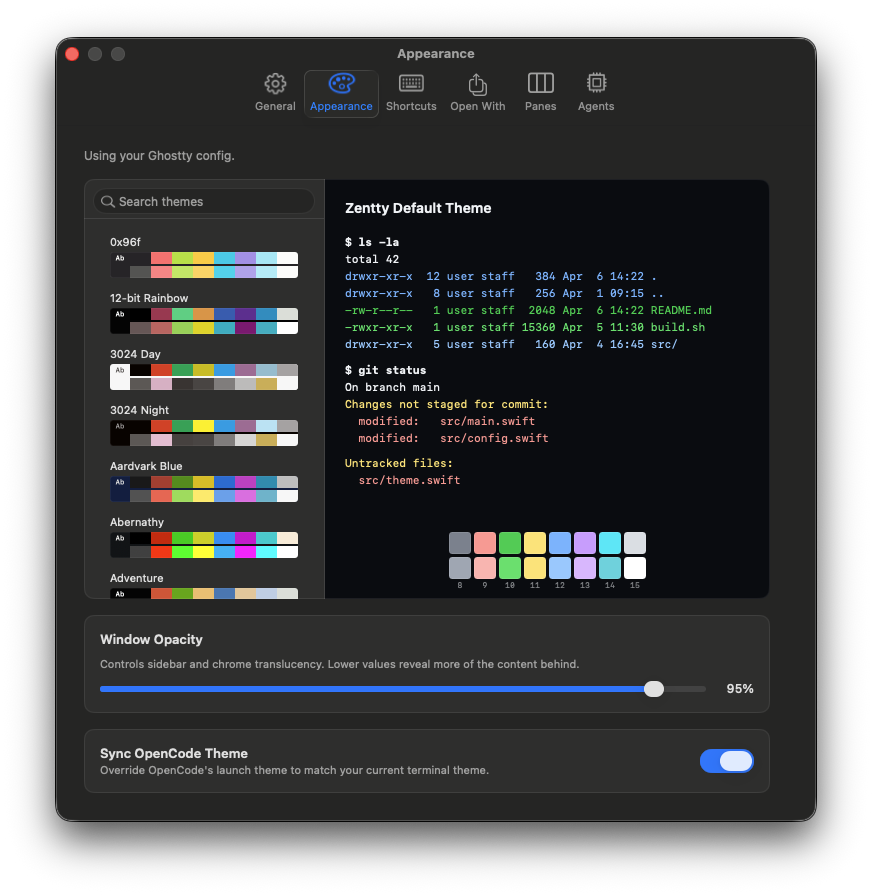
Zentty resolves themes from Ghostty's bundled themes plus
~/.config/ghostty/themes. Drop a custom Ghostty theme file in
that directory, then reload configuration or change the theme from
Settings.
Settings Walkthrough
- Open Settings with Cmd+,.
- Use Appearance for theme, opacity, and OpenCode theme sync.
- Use Shortcuts for preset selection and per-command rebinding.
- Use Restore, Notifications, and Agent sections for launch behavior and long-running agent support.
Config File
Zentty stores app settings at
~/.config/zentty/config.toml. The app creates the file on
first run, watches it for changes, normalizes invalid options, and ignores
invalid reloads rather than crashing the session.
TOML comments are preserved where possible, partial reloads apply only
valid sections, and parse errors are surfaced in app diagnostics instead
of replacing the last good in-memory config. To reset to defaults, quit
Zentty and move ~/.config/zentty/config.toml aside.
[sidebar]
visibility = "pinnedOpen"

[pane_layout]
laptop = "compact"
large_display = "balanced"
ultrawide = "balanced"
right_split_behavior = "adaptive"

[appearance]
local_theme_name = "TokyoNight"
local_background_opacity = 0.85
Key Settings
The config file is intentionally small and local. Unknown keys are ignored where possible, invalid values are rejected during reload, and settings UI writes normalized TOML back to the same file.
| Key | Use | Default | Valid Values |
|---|---|---|---|
[sidebar].width | Sidebar width in points. | 280 | Positive number. |
[sidebar].visibility | Initial sidebar state. | pinnedOpen | pinnedOpen, pinnedClosed, overlay. |
[pane_layout].laptop | Pane layout preset for laptop-sized windows. | compact | compact, balanced, spacious. |
[pane_layout].large_display | Pane layout preset for large displays. | balanced | compact, balanced, spacious. |
[pane_layout].ultrawide | Pane layout preset for ultrawide displays. | balanced | compact, balanced, spacious. |
[pane_layout].right_split_behavior | How right splits are placed when width is tight. | adaptive | adaptive, alwaysVisible, appendScrollable. |
[pane_layout].visible_split_window_width | Minimum window width used for visible right splits. | 1200 | Positive number. |
[panes].show_labels | Show pane labels. | true | true, false. |
[panes].inactive_opacity | Inactive pane opacity. | 0.84 | 0.6 through 1.0. |
[appearance].local_theme_name | Ghostty theme name selected for Zentty. | Zentty default | Any resolved Ghostty theme name. |
[appearance].local_background_opacity | Terminal background opacity override. | 1.0 | 0.0 through 1.0. |
[appearance].sync_opencode_theme_with_terminal | Keep OpenCode's theme aligned with the terminal theme. | false | true, false. |
[open_with].primary_target_id | Default Open With target id. | finder | Built-in or custom target id. |
[open_with].enabled_target_ids | Ordered list of enabled Open With targets. | finder, vscode, cursor, xcode | Array of target ids. |
[updates].channel | Update channel. | stable | stable, beta. |
[restore].restore_workspace_on_launch | Restore windows, worklanes, panes, and supported agent context on launch. | true | true, false. |
[agent_teams].enabled | Enable the tmux shim for compatible multi-agent workflows. | false | true, false. |
[agent_caffeination].enabled | Keep the machine awake while tracked agents are active. | false | true, false. |
OpenCode Theme Sync
OpenCode has a theme surface that can be aligned with the terminal theme.
When [appearance].sync_opencode_theme_with_terminal is true,
Zentty updates the generated OpenCode overlay for launches it owns. Other
agents do not currently expose the same stable theme hook.
Open With Targets
Open With can launch the focused working directory in built-in targets or custom apps you add. The default enabled targets are Finder, VS Code, Cursor, and Xcode.
[[open_with.custom_apps]]
id = "zed-preview"
name = "Zed Preview"
path = "/Applications/Zed Preview.app"Worklane Colors
Worklane colors are local organization metadata. They tint sidebar rows, pane rows, focus borders, and related chrome without changing terminal theme colors.
Pick them from the sidebar when color helps separate durable contexts; leave them alone when names and order already carry enough meaning.
Agent Caffeination
Agent caffeination keeps the Mac awake while tracked agents are active, so long-running turns do not pause halfway through. Enable it for unattended work on power; leave it disabled when battery life matters more than continuous agent execution.
Sync And Portability
~/.config/zentty/config.toml is dotfile-manager friendly.
Avoid syncing machine-specific app paths unless the same apps exist on
each Mac. Bookmarks can be synced too, but working directories should be
stable across machines for restore to be useful.
Additional Settings
These settings are smaller than theme or layout configuration, but they affect daily behavior enough to keep documented.
| Area | Controls |
|---|---|
| Sidebar | Width, pinned visibility, labels, and inactive pane opacity. |
| Shortcuts | Individual bindings, preset application, and conflict handling. |
| Notifications | Notification sound and attention routing. |
| Confirmations | Close-pane, close-window, and quit prompts. |
| Updates | Stable or beta update channel. |
| Restore | Workspace restore on launch and recently closed pane behavior. |
| Copying | Always-clean clipboard copies. |
| Agents | Agent Teams and agent caffeination. |